Code generation
Unrevealed comes with a CLI that lets you generate code. Using the CLI will allow you to automaticaly type the SDKs. This has multiple benefits:
- Autocomplete: Don't open Unrevealed every time you need to know the key of a feature
- Validation: Never make typos anymore, or forget to pass the right attributes of your users and teams
- Maintenance: Easily clean up your features by archiving them on Unrevealed then running the CLI to remove them from your codebase
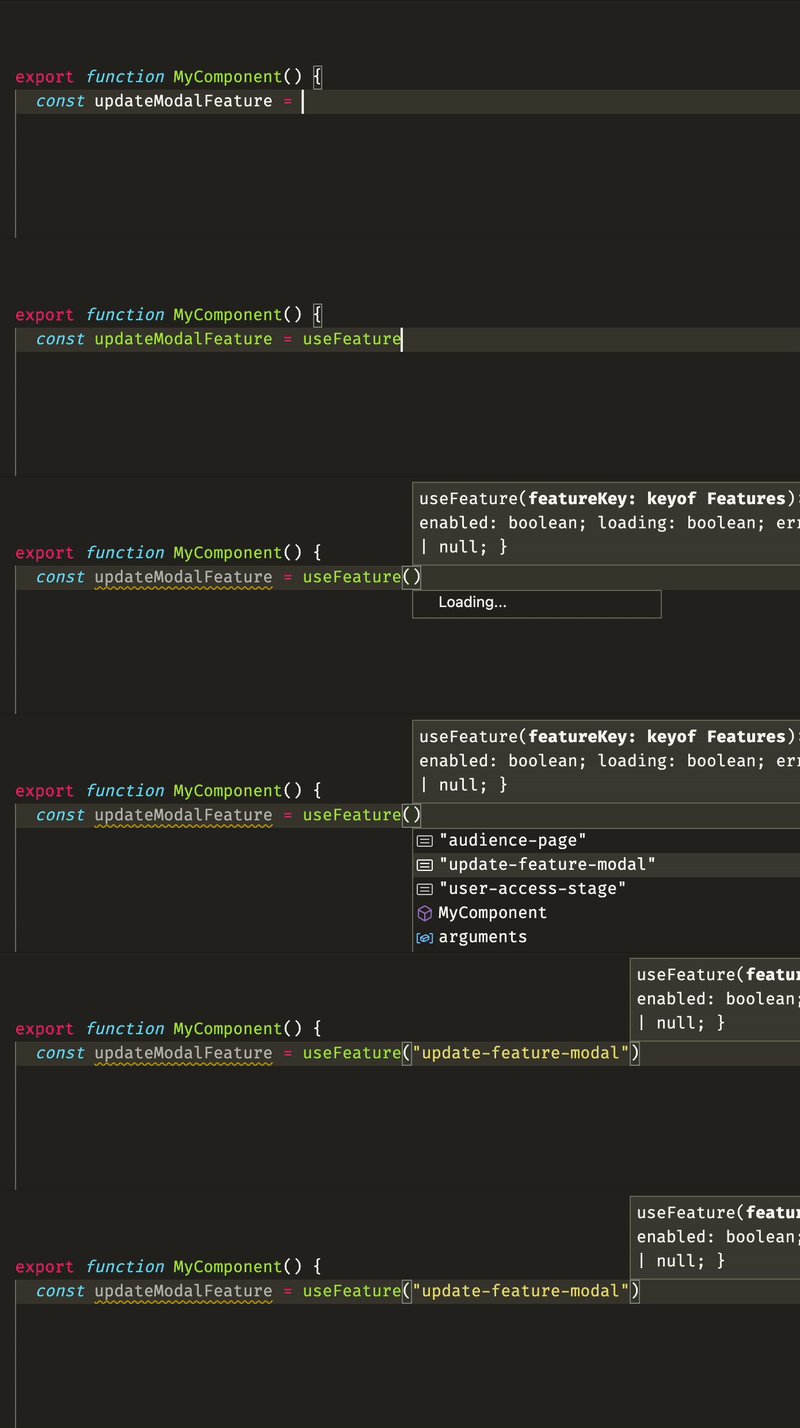
Getting started
Install the CLI. We recommend adding is as a devDependency of your project. If you have a monorepo, we also recommend installing it at the root if you're using it in multiple applications.
npm install -D unrev
Usage
- Login to Unrevealed
unrev login
- Initialize your config
unrev init
This will ask you a few questions and generate unrevealed.config.json at the root of your project.
- Generate
unrev generate
This command will generate types for the target SDKs, based on unrevealed.config.json
unrevealed.config.json
The unrevealed config file is used by the CLI and the VS Code extension to generate code and give you context about your features. Here's an example of config file:
{
  "productId": "YOUR_PRODUCT_ID",
  "generates": {
    "apps/webapp/src/generated/unrevealed.ts": {
      "sdk": "react"
    },
    "apps/api/src/generated/unrevealed.ts": {
      "sdk": "node"
    }
  }
}